
Best Laptop for Seniors 2026? Here Are the Top Picks That Actually Make Sense!

If you are shopping for a best laptop for seniors 2026 model, you have probably noticed something frustrating. Every tech site throws out the same generic advice. “Get a MacBook Air” or “Buy whatever is on sale.” But here is the thing – seniors have specific needs that most reviewers completely ignore. Things like large, easy-to-read screens, simple interfaces that do not overwhelm, and keyboards that do not require a magnifying glass to see the letters.
Maybe you are buying for yourself, or maybe you are helping a parent or grandparent find something that will not collect dust in a drawer. Either way, this guide cuts through the noise. We are going to look at what actually matters, which laptops check the right boxes, and how to avoid wasting money on features seniors will never use.
What Seniors Actually Need in a Laptop? (Not What Tech Bros Think)
Before we dive into specific models, let us talk about what makes a laptop truly senior-friendly. Because here is a secret most tech reviewers will not tell you – raw processing power is usually the least important thing on the list.
1. A Screen You Can Actually See
This is probably the biggest deal-breaker. A 13-inch screen might look sleek, but squinting at tiny text is not fun for anyone. Most experts agree that a large screen laptop for older adults should be at least 15 inches, with 16 or 17 inches being even better for comfortable viewing. According to ASUS, a 15- or 16-inch screen strikes the right balance between visibility and portability, allowing seniors to increase font sizes and zoom in on web pages without everything turning into a cluttered mess.
OLED screens are a nice bonus too. They offer much better contrast than regular LCD screens, which means text looks sharper and black backgrounds look truly black instead of washed-out gray. Some OLED displays even reduce harmful blue light by up to 70 percent compared to traditional screens, which is great for reducing eye strain during long browsing sessions.
2. A Keyboard That Does Not Fight Back
You know what is surprisingly hard to find? A keyboard with full-size keys that are actually spaced apart. Many laptops cram keys together to save space, which is fine if you are a 20-year-old gamer but not so great if your hands are not as nimble as they used to be.
Look for a senior-friendly laptop with backlit keyboard so keys light up in dim rooms. A full numeric keypad is also handy for anyone who does online banking or enters numbers regularly.
3. Battery Life That Does Not Quit After Lunch
Nothing kills the vibe like a laptop that dies two hours into a video call with the grandkids. A good laptop with long battery life for seniors should last at least 10 to 12 hours on a single charge. Some 2026 models now push past 20 hours, which means you can go days without hunting for a charger.
4. A Fanless Design (Because Silence Is Golden)
Here is something most people do not think about until it is too late – fan noise. Many laptops sound like tiny vacuum cleaners when they get warm. For seniors who use their laptop in quiet environments like bedrooms or libraries, a fanless laptop for seniors is a game-changer. No noise, no hot air blowing on your hands, and one less moving part that can break.
5. Simple Setup and Real Support
Let us be honest – nobody wants to spend three hours on the phone with tech support. The best laptops for seniors come with straightforward setup processes and, ideally, the option to walk into a physical store if something goes wrong. Apple Stores are great for this, and HP offers friendly phone support with real people plus an app called HP Support Assistant that can fix common problems automatically.
The Best Laptops for Seniors in 2026 – Ranked by Real-World Use
Now let us get to the good stuff. Here are the top picks, broken down by what kind of senior you are shopping for.
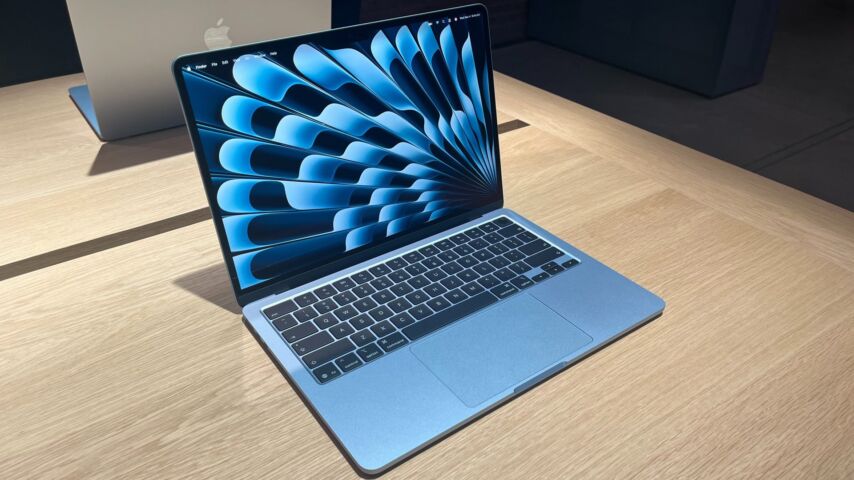
1. M5 MacBook Air (15-inch) – Best Overall for Most Seniors
If budget is not the primary concern, the 15-inch M5 MacBook Air is tough to beat. It is one of the most widely recommended laptops for a reason.
Why it works for seniors:
- The 15.3-inch display is sharp and bright, with a resolution of 2880 x 1864. Text looks crisp, colors pop, and you can use it indoors or outdoors without issues.
- The backlit Magic Keyboard has a Touch ID sensor built into the power button. Forget your password? Just tap your finger. No typing required.
- It is completely fanless, so it stays silent and never gets hot during daily use.
- The trackpad is widely considered the best in the business – smooth, precise, and large enough to use comfortably.
- Battery life is all-day, so you can browse, video chat, and stream without constantly looking for an outlet.
- If something breaks, you can walk into any Apple Store for help. That peace of mind is huge.
The downside: It starts around $1,100, which is not cheap. But if you want something that will last 7 to 10 years without feeling outdated, this is it.
2. HP OmniBook 5 (14-inch) – Best Battery Life Champion
If the thought of charging a laptop every single day annoys you, meet the HP OmniBook 5. This thing is a battery life monster.
Why it works for seniors:
- Over 30 hours of battery life in testing. Yes, you read that right. You could forget to charge it for two days and still be fine.
- The 14-inch OLED display delivers deep blacks and vivid colors. Watching movies or looking at photos is a genuinely pleasant experience.
- It has an infrared camera for biometric login, so you can unlock it with your face instead of typing a password.
- The keyboard is responsive and comfortable for typing emails or messages.
- At 2.85 pounds, it is lightweight enough to carry around the house or take to a friend’s place.
The downside: The build is mostly plastic, so it does not feel as premium as a MacBook. But for the price and battery life, that is a fair trade.
3. MacBook Neo – Best Budget Pick for Apple Fans
Not everyone wants to drop over a grand on a laptop, and Apple gets that. The MacBook Neo is their answer to budget-conscious buyers who still want the Apple experience.
Why it works for seniors:
- At around $690, it is significantly cheaper than the MacBook Air but still delivers excellent performance for everyday tasks.
- The A18 Pro chip keeps things running smoothly for web browsing, video calls, and media streaming.
- Battery life exceeds 13 hours, which is solid for the price.
- It has a premium aluminum body that looks and feels more expensive than it is.
- The trackpad is just as good as the Air’s, and the keyboard is spacious and comfortable.
- Like all MacBooks, you can take it to an Apple Store for support.
The downside: The keyboard is not backlit, which can be annoying in dim rooms. Also, if you want Touch ID, you need to upgrade to the 512GB model for an extra $100.
4. Lenovo Chromebook Plus 14 – Best for Simplicity Lovers
Some seniors just want something that works without any fuss. No updates that take forever, no antivirus software, no confusing settings menus. If that sounds appealing, a Chromebook for seniors might be the perfect fit.
Why it works for seniors:
- ChromeOS is dead simple. It is basically a web browser with a desktop. If you can use Google Chrome, you can use this.
- The 14-inch OLED display offers incredible contrast, making text sharp and easy to read.
- It is fanless, so operation is whisper-quiet.
- Weighs only 2.58 pounds and is just 0.62 inches thick, so it is easy to carry around.
- Battery life ranges from 17 to 19 hours depending on use, which is fantastic.
- The textured bottom provides a better grip when carrying it, which is a small but thoughtful touch.
The downside: Chromebooks rely heavily on internet connectivity. Offline functionality is limited compared to Windows or macOS. If you do not have reliable Wi-Fi at home, this might not be the best choice.
5. Acer Aspire 16 AI – Best Big Screen on a Budget
If the number one priority is screen size, the Acer Aspire 16 AI delivers a massive 16-inch display without the massive price tag or weight.
Why it works for seniors:
- The 16-inch screen is one of the largest you will find in a laptop that is still reasonably portable.
- The 120Hz refresh rate makes scrolling feel smooth and responsive, which is easier on the eyes.
- At 3.5 pounds and 0.6 inches thick, it is surprisingly light for a 16-inch laptop. Most competitors weigh 4 pounds or more.
- The backlit keyboard and infrared camera for face login are included.
- A sharp 1440p webcam makes video calls look great.
- Over 20 hours of battery life means you can use it all day without plugging in.
The downside: The display is a standard LCD, not OLED, so colors and contrast are not as impressive as some other picks. But for the price and screen size, it is still a great value.
6. ASUS Chromebook Plus CX34 – Best Budget All-Rounder
If you want a lightweight laptop for seniors that does not break the bank, this ASUS Chromebook is worth a look.
Why it works for seniors:
- The keyboard and trackpad are comfortable and spacious, which is rare on budget laptops.
- The 1080p touchscreen is bright and responsive for everyday use.
- Battery life is around 12 hours, which is respectable.
- It weighs just over 3 pounds, so it is easy to move around.
- The 1080p webcam produces crisp video for family calls.
The downside: It only has 128GB of storage, which is fine for cloud-based use but limiting if you want to store lots of photos or videos locally.
Quick Comparison Table
Still trying to sort through all those details? No worries – here is a side-by-side look at the top picks so you can compare the key specs at a glance. This should make it way easier to spot which laptop lines up with what you actually need.
| Laptop | Screen Size | Weight | Battery Life | Best For | Starting Price |
|---|---|---|---|---|---|
| M5 MacBook Air 15″ | 15.3″ | ~3.3 lbs | All-day | Best overall, Apple ecosystem | ~$1,100 |
| HP OmniBook 5 14″ | 14″ | 2.85 lbs | 30+ hours | Battery life champions | ~$900 |
| MacBook Neo | 13″ | ~2.7 lbs | 13+ hours | Budget Apple option | ~$690 |
| Lenovo Chromebook Plus 14 | 14″ | 2.58 lbs | 17-19 hours | Simplicity, quiet operation | ~$500 |
| Acer Aspire 16 AI | 16″ | 3.5 lbs | 20+ hours | Biggest screen, budget price | ~$600 |
| ASUS Chromebook Plus CX34 | 14″ | 3.17 lbs | ~12 hours | Budget all-rounder | ~$400 |
What to Avoid When Buying a Laptop for a Senior?
Now that we have covered the good options, let us quickly run through some common mistakes people make.
1. Do Not Buy a Gaming Laptop Unless They Actually Game
A Lenovo LOQ or MSI gaming laptop might have impressive specs, but they are heavy, loud, and overkill for checking email and watching YouTube. Save the gaming rigs for actual gamers.
2. Do Not Assume a 13-inch Screen Is “Fine”
Yes, 13-inch laptops are popular because they are portable. But for seniors with any vision concerns, a small screen is a daily frustration. Go bigger.
3. Do Not Ignore the Operating System
If someone has used Windows their whole life, throwing them into macOS can be jarring. Likewise, if they are deep in the Apple ecosystem with an iPhone and iPad, a Windows laptop will feel foreign. Match the laptop to their comfort zone.
4. Do Not Skimp on RAM
Even for basic use, 8GB of RAM is the minimum in 2026. 16GB is better if the budget allows. Less than 8GB and the laptop will start feeling sluggish within a year or two.
Frequently Asked Questions
Got more questions? You are not alone. These are the things people ask over and over again when shopping for a laptop for a senior, so let us clear them up right now.
1. What screen size is best for seniors who have trouble seeing?
A 15-inch screen is the sweet spot for most seniors, but 16 or 17 inches is even better if portability is not a major concern. The larger the screen, the less you need to zoom in or squint. A full HD resolution (1920 x 1080 or higher) also helps keep text sharp and clear.
2. Are Chromebooks actually good for seniors, or are they too limited?
Chromebooks are genuinely great for many seniors, especially those who mainly browse the web, check email, and use Google apps. They are simpler than Windows or macOS, update automatically, and rarely get viruses. The main limitation is offline use – if the internet goes down, functionality drops significantly. But for seniors with reliable Wi-Fi, a Chromebook for seniors is often the easiest and most affordable option.
3. Is it worth paying extra for a MacBook, or is a cheap Windows laptop good enough?
It depends on the person and their needs. MacBooks cost more upfront but tend to last longer, receive software updates for 7+ years, and come with excellent in-person support at Apple Stores. A cheap Windows laptop might feel fine for a year or two but often slows down and becomes frustrating. If the budget allows, a MacBook Air or MacBook Neo is usually the better long-term investment.
Conclusion
Finding the best laptop for seniors 2026 does not have to be overwhelming. The key is to focus on what actually matters – a big, clear screen, a comfortable keyboard, long battery life, and a simple interface. Fancy specs and gaming-grade processors are nice for bragging rights, but they do not help a senior send an email or video chat with their grandkids.
If you want the safest all-around pick, the 15-inch M5 MacBook Air is hard to beat. If budget is tight, the MacBook Neo or a Chromebook like the Lenovo Chromebook Plus 14 are excellent alternatives. And if battery life is the top priority, the HP OmniBook 5 will keep running long after most other laptops have died.
At the end of the day, the best laptop is the one that gets used. Pick something that feels comfortable, looks inviting, and does not require a computer science degree to operate. Your future self (or your loved one) will thank you.